
The Website Launch Checklist: 42 Checks Before, During and After Go-Live
The website launch checklist we run on every site - pre-launch SEO and technical checks, launch day itself, and the post-launch checks most people skip.
R Ryan Heinrich Founder & lead developer
Launch day is when small oversights become public. A contact form quietly failing, a page
still carrying placeholder text, a noindex tag nobody switched off - each is trivial to fix
beforehand and embarrassing to discover weeks later, usually because a customer mentions it.
This is the go live checklist we run on every website, and the part most checklists leave out: what to check on launch day itself, and in the weeks afterwards. It applies whether your site is WordPress, Webflow, Squarespace, Shopify or hand-built - the platform changes where you click, not what needs checking.
Before you launch: content
1. Proofread every page. Read it aloud. You will catch things your eye skips over, particularly in headings, which is where typos survive longest because nobody proofreads big text.
2. Hunt for placeholder text. Search the whole site for “lorem ipsum”, “TBC”, “coming soon”, “Your Company Name” and any leftover theme sample copy. Check image captions and footer text too - that is where it hides.
3. Check your business details. Phone number, email and address, everywhere they appear. Then actually dial the number and send a test email. A transposed digit is invisible on screen and costs you every enquiry.
4. Make your details consistent with everything else. Your name, address and phone must match your Google Business Profile and directory listings character for character. That consistency is a local search ranking signal, and “Street” versus “St” is enough to weaken it.
5. Confirm you can use every image. Own it, licensed it, or have written permission. This is the one item on this list that occasionally becomes a legal letter.
6. Add alt text to images. Descriptive, written for someone using a screen reader rather than stuffed with keywords. It helps accessibility and image search at the same time.
Before you launch: the pre-launch SEO checklist
If you only have an hour, spend it here. These are the checks that are cheap now and expensive later.
7. Unique page titles. Every page, roughly 50 to 60 characters, the main term near the front. Not “Home”, “Page 2” and three pages all called “Services”.
8. Unique meta descriptions. Under about 160 characters, written as a sentence rather than a keyword list. This is your advert in the search results - it does not affect ranking directly, but it decides whether anyone clicks.
9. One H1 per page that plainly states what the page is about.
10. Remove the noindex tag. The single most common launch mistake, by a distance. Sites
are built with it on so the unfinished version stays out of Google, and then nobody switches
it off. On WordPress, check Settings → Reading → Discourage search engines. On Webflow,
check the page settings and the site-wide SEO tab. Then view source on the live site and
search for noindex to be certain.
11. Check robots.txt. Visit yourdomain.co.za/robots.txt and make sure it is not
blocking everything with Disallow: /. Staging configurations get copied to production more
often than anyone admits.
12. Generate an XML sitemap and confirm it lists the pages you actually want indexed - not tag archives, not author pages, not the thank-you page.
13. Set up Google Search Console and Google Analytics before launch. Then you have baseline data from day one instead of starting the clock a month late, wondering whether anything changed.
14. Submit the sitemap in Search Console once the site is live.
15. Add structured data for your business - name, address, phone, opening hours, services. It is what makes rich results possible, and most small business sites simply do not have it.
16. Give each page a single clear purpose. Two pages targeting the same thing compete with each other, and neither wins. If you have a services page and a service page saying the same thing, merge them or differentiate them properly.
Before you launch: technical
17. Test on real devices. Not a narrow browser window - an actual phone, ideally two, and ideally one cheap Android. Most South African traffic is mobile, often on a mid-range handset and a patchy connection.
18. Check every link. Internal and external. Broken links on a brand new site look careless, and they are the easiest thing on this list to check automatically.
19. Confirm SSL is active. The padlock should show on every page with no mixed-content
warnings. One http:// image reference is enough to break it.
20. Force one canonical version. Pick https:// and either www or non-www, then redirect
everything else to it in a single hop. Four reachable versions of the same site splits your
ranking signals four ways.
21. Test page speed on mobile. Run Google PageSpeed Insights against the mobile tab, not desktop, and test a real content page rather than only the homepage. See why a fast website wins more business for what the thresholds actually are.
22. Set up automated backups and confirm one has actually run. An untested backup is a rumour.
23. Create a custom 404 page that helps people get back on track - a search box and links to your main sections - rather than dead-ending them.
24. Redirect old URLs. If you are replacing an existing site, 301 every old URL to its closest new equivalent, one to one. Not everything to the homepage: many-to-one redirects lose the relevance you are trying to preserve and can be treated as soft 404s. This is the step that most often costs a rebuild its existing rankings.
25. Check your redirects actually work by requesting the old URLs and confirming a 301 and the right destination, before you announce anything.
Before you launch: forms and functionality
26. Submit every form yourself and confirm the email arrives. Then check the spam folder, because that is frequently where it lands. This is the check people skip most often and regret most.
27. Test from an outside address, not your own domain. Forms often work when you test them and fail for everyone else, because the sending and receiving domain are the same.
28. Confirm the auto-reply, if you have one, and read it. It is the first thing a new enquiry receives from you.
29. Test the full checkout on a store with a real card, not just the sandbox. Confirm the order confirmation email sends, and that stock decrements.
Before you launch: legal pages and compliance
What legal pages should be ready before a website goes live?
At minimum, a South African business site needs a privacy policy, and terms and conditions. If you sell anything online, add a refund and returns policy. If you use analytics or any tracking, you also need a cookie consent mechanism that genuinely blocks tracking until someone accepts.
30. Publish a POPIA-compliant privacy policy and link it from every page. More detail in our POPIA guide, and POPIA Ready will generate the documents.
31. Add a consent note to every form collecting personal information, saying what you will do with it.
32. Make cookie consent actually work. A banner that sets cookies regardless of the choice is worse than no banner, because it documents that you knew.
33. Add terms and conditions, plus refund and returns if you sell online.
Launch day itself
34. Lower your DNS TTL 24 hours beforehand. Drop it to 300 seconds the day before you switch. It means a mistake propagates back in five minutes instead of a day.
35. Launch early in the day, early in the week. Never on a Friday afternoon. If something breaks you want everyone available, not a weekend of a broken site.
36. Check the live site, not staging. Load the real domain in a private window and walk the main paths. It is remarkably easy to spend twenty minutes admiring the staging site.
37. View source on the live homepage and confirm the title tag, the canonical, and no
noindex. Ten seconds, and it catches the most expensive mistake on this list.
38. Submit one form on the live site and confirm delivery. Staging and production often have different mail configurations.
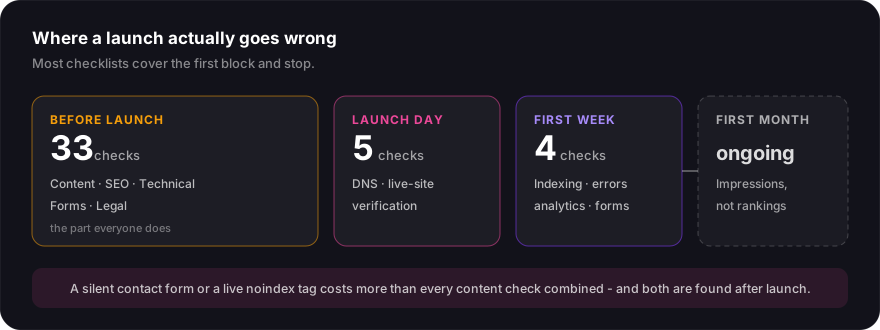
The post-launch checklist: your first week
Launch is not the finish line, and the post-launch checks are the part most checklists skip entirely - which is odd, because this is where the expensive failures actually surface.
39. Request indexing for your most important pages in Search Console rather than waiting. Discovery through the sitemap alone can take days.
40. Check Search Console for crawl errors and the Pages report for anything unexpectedly
excluded. “Discovered - currently not indexed” is normal at first; noindex in there is not.
41. Confirm analytics is recording real visits by visiting the site yourself and watching Realtime. Plenty of sites launch with the tracking code on the staging build only.
42. Ask three people outside the business to use the site and tell you what confused them. You cannot see your own site clearly and neither can anyone who built it.
Watch for form submissions actually coming through in that first week. A silent contact form can go unnoticed for months, and you have no way of knowing what it cost you.
The post-launch checklist: your first month
The checks change from “does it work” to “is it doing anything”.
- Watch impressions, not rankings. Search Console impressions tell you Google is showing you for something. Rankings fluctuate daily and will drive you mad.
- Expect eight to twelve weeks before organic search settles. Judging a new site at week two tells you nothing except that it is new.
- Set up your Google Business Profile properly if you serve a local area. For most small businesses it produces enquiries faster than the website does - see our Google Business Profile guide.
- Fix what the data shows, not what you assumed. The pages you thought mattered and the pages that earn impressions are often not the same pages.
The short version
If you have fifteen minutes rather than a day, do these five:
- Confirm
noindexis off on the live site - Submit every form and confirm the email arrives
- Check the site on a real phone
- Redirect old URLs one-to-one if you are replacing a site
- Publish a privacy policy and make cookie consent work
Those five account for most of the launch failures we see, including on sites built by other agencies.
Launching something soon and want a second pair of eyes before it goes live? Get in touch - we are happy to run through this with you, whether or not we built the site.
Written by Ryan Heinrich
Founder & lead developer, Fusion By Design
Ryan is the founder of Fusion By Design and has spent 14+ years designing and building websites for South African businesses - from single-page trade sites to directory platforms. He now builds custom software, SaaS and AI tools too, including his own products POPIA Ready, Spreadli and PluginLyzer. He does the design and the development himself, which is why you deal with the person who builds your project rather than an account manager.